Desktop Companion
Private Beta · invited testers only, no public download
The companion is a small Windows program that reads your own champion select from the League client on your PC and shows your team’s chance to win, the best picks for your seat and the lane verdict over it. It is in private beta: it is offered only to invited testers, it cannot be downloaded publicly, and the build is not yet code-signed.
There is no public download yet. The beta is by invitation: the button opens an email to us; say which server you play on.
Have a tester key?
Enter it to download the current installer. A key downloads each version once and opens the companion on one PC; the companion asks for the same key the first time it opens. A build stops working 14 days after it is made.
In a real game
Ranked games on our own account, from the ban turn to the review after the game. Team-mates appear as the client shows them in champion select; on the loading screen, where the game shows every player, the other players' names are blurred here.
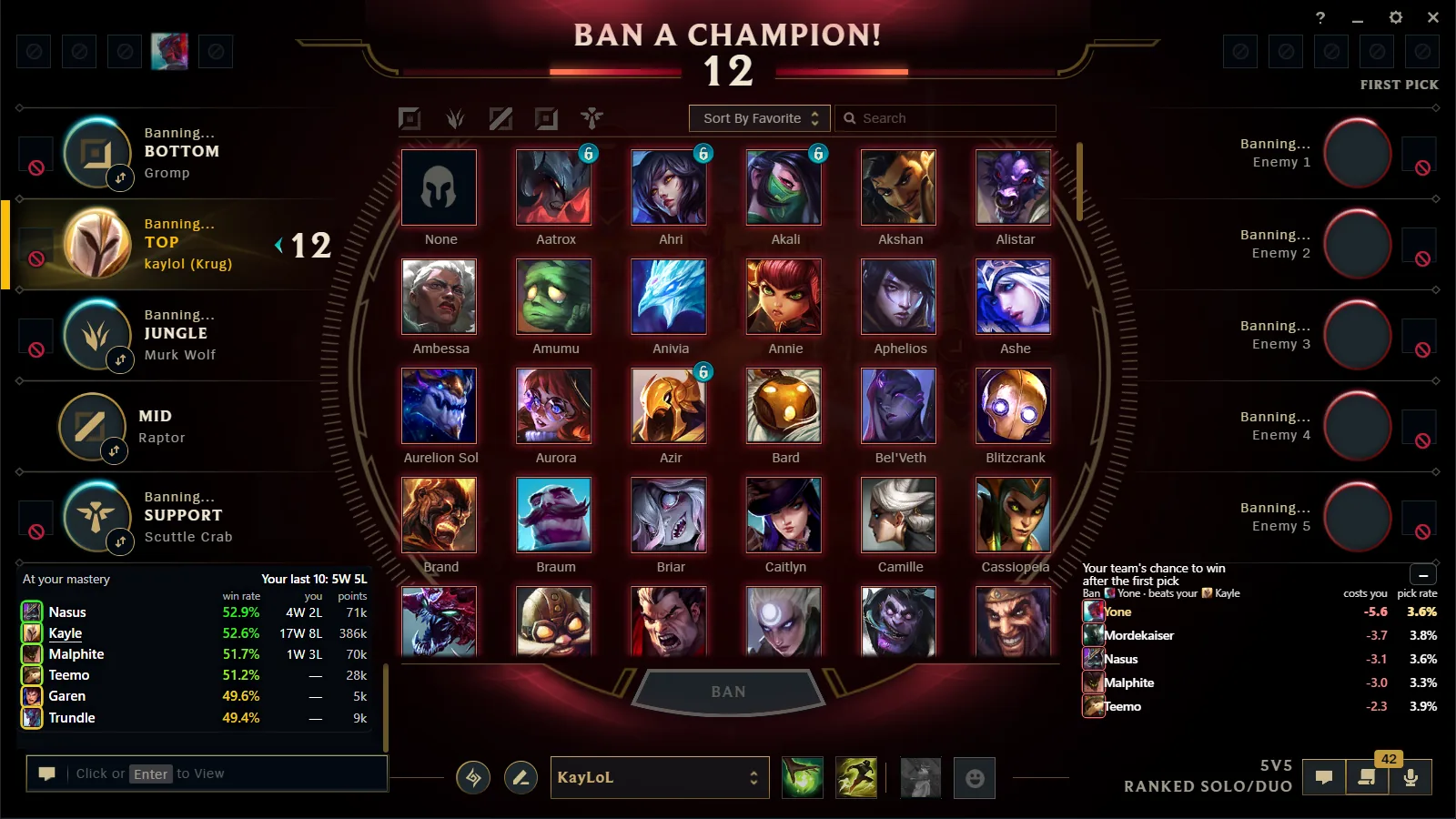
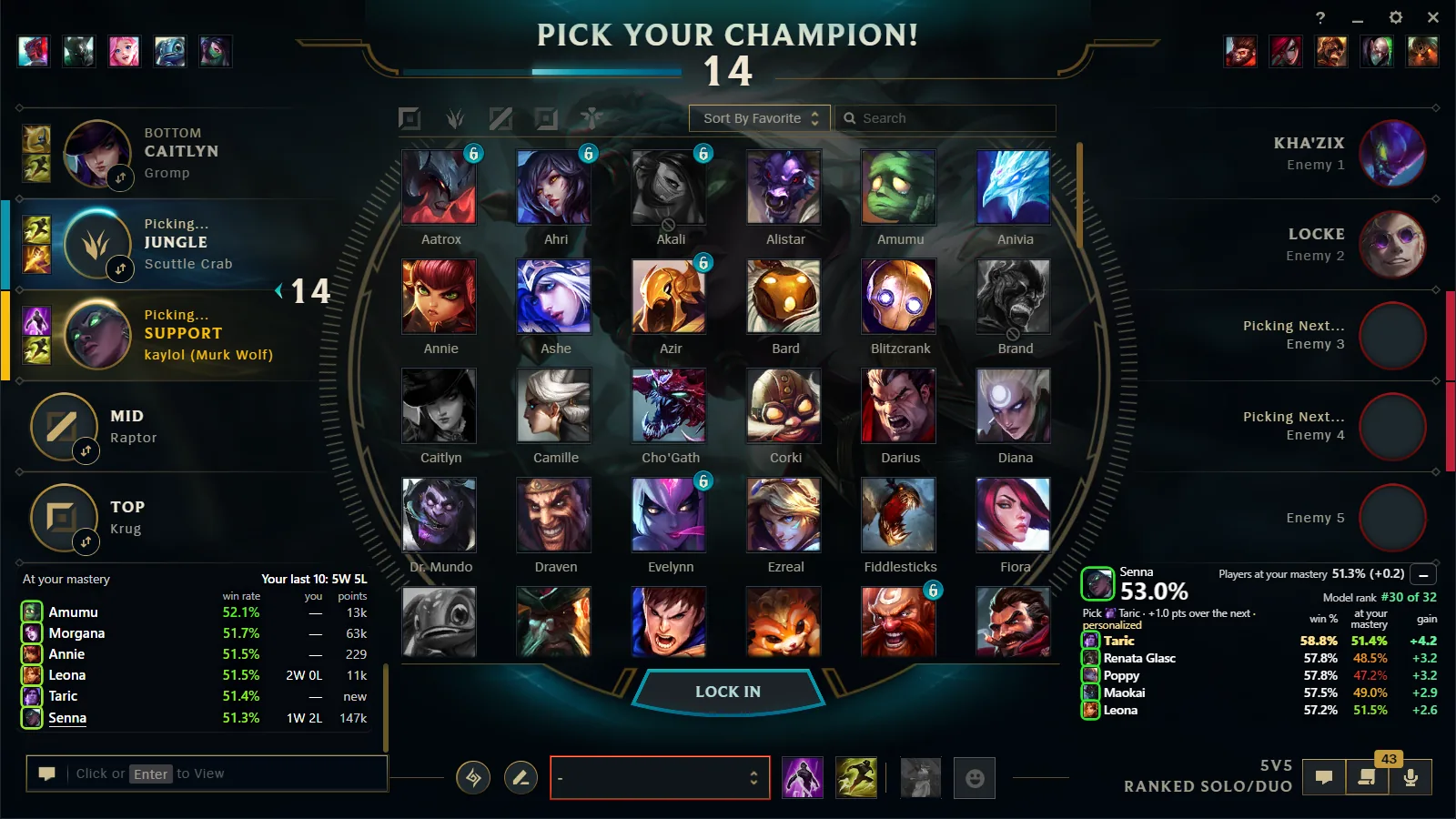
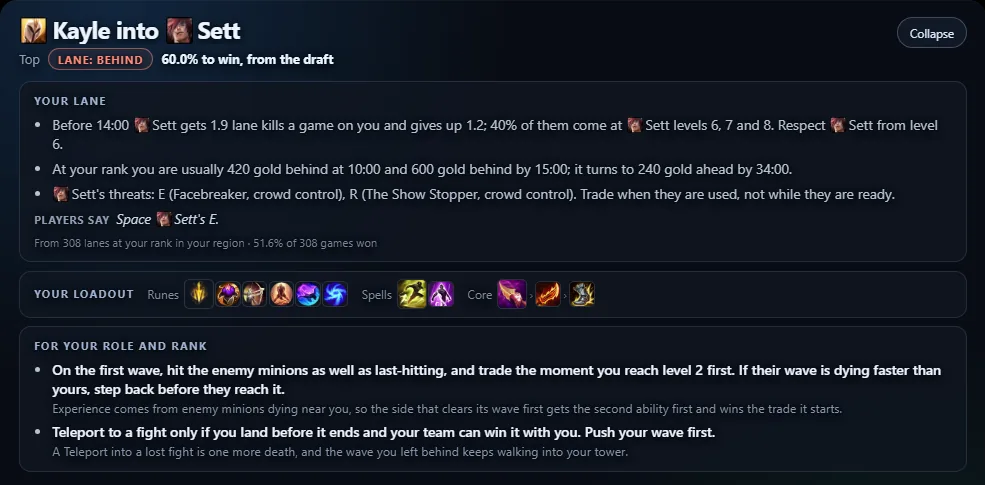
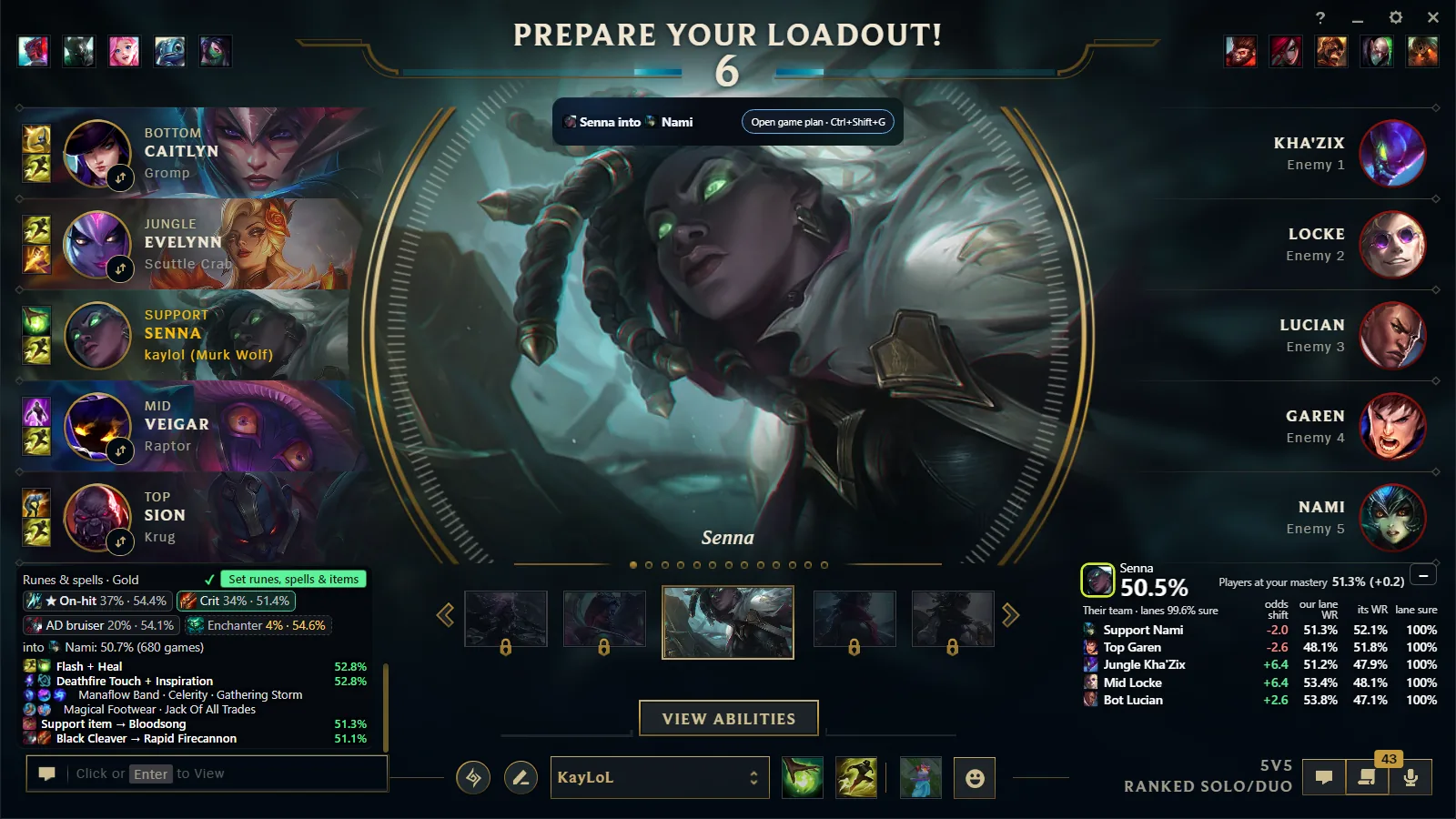
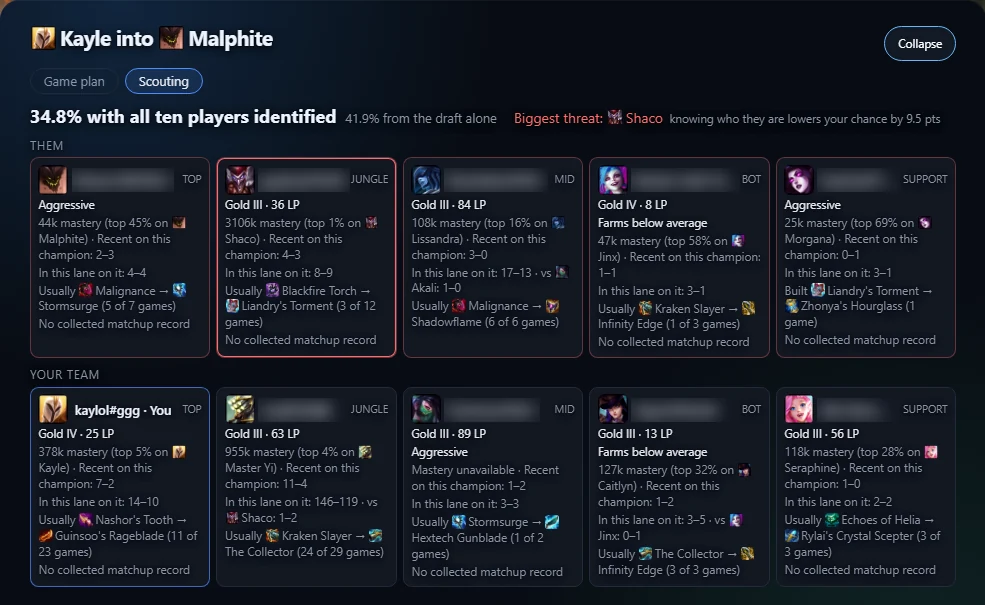
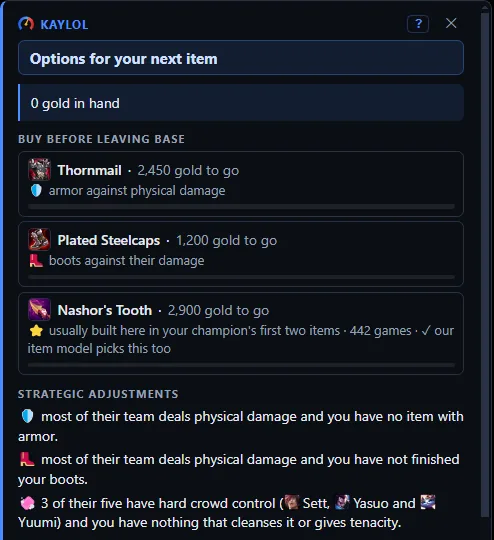
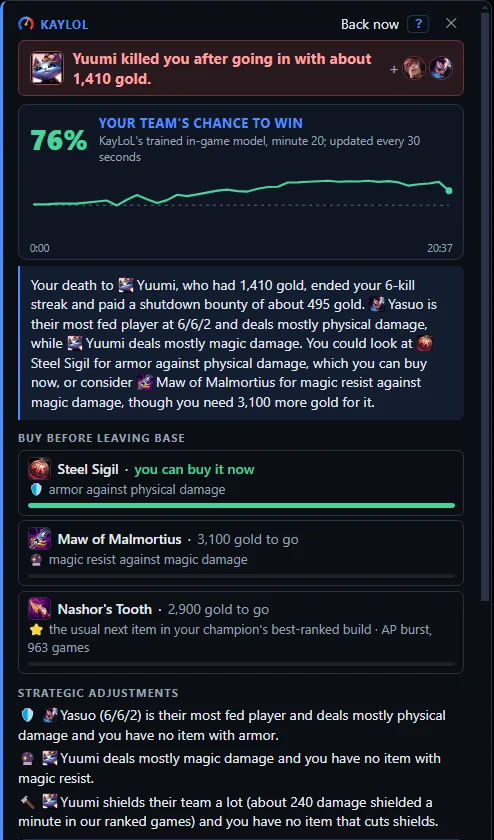
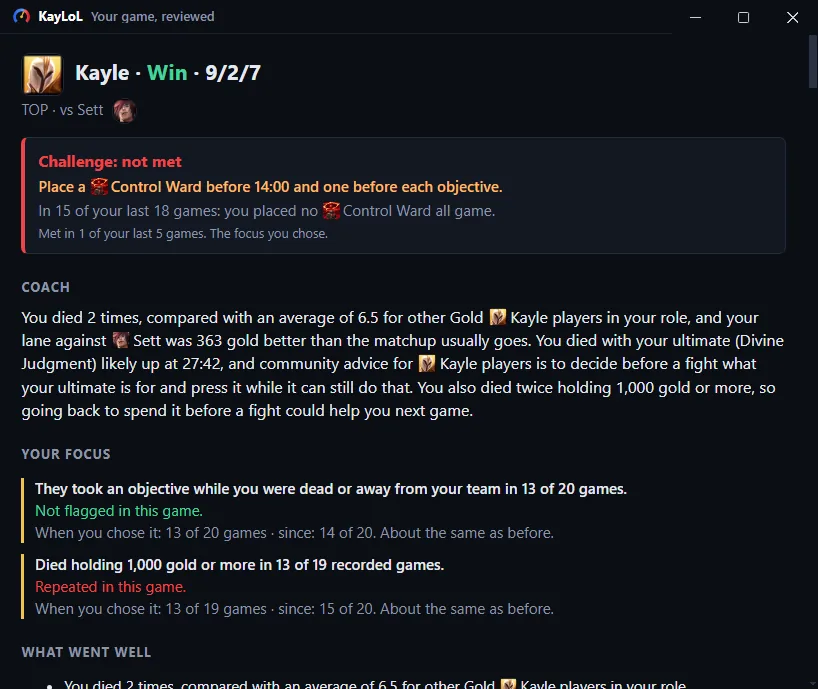
 Your ban turn.Your pick turn.After you lock.Every champion locked.On the loading screen.When you open Items.While you wait to respawn.After the game.A note for next time.
What it does
- Shows your team’s chance to win as champion select fills, from the same model as the draft page.
- On your own turn, ranks the champions for your seat, with both teams’ bans left out.
- Suggests bans on your ban turn and, once your champion locks, a build, runes and summoner spells taken from the site’s public tables.
- When all ten champions are locked, says whether trading lanes inside your team would help.
- Shows how players at your mastery do on a champion, and your own recent results.
- Can set the recommended rune page and summoner spells when you press its Set button. From version 0.3.65 the same press also puts an item list for that game in League's own shop, as an item set named “KayLoL”, and keeps it up to date until the game starts. Those are the only changes it ever makes to your client (see below).
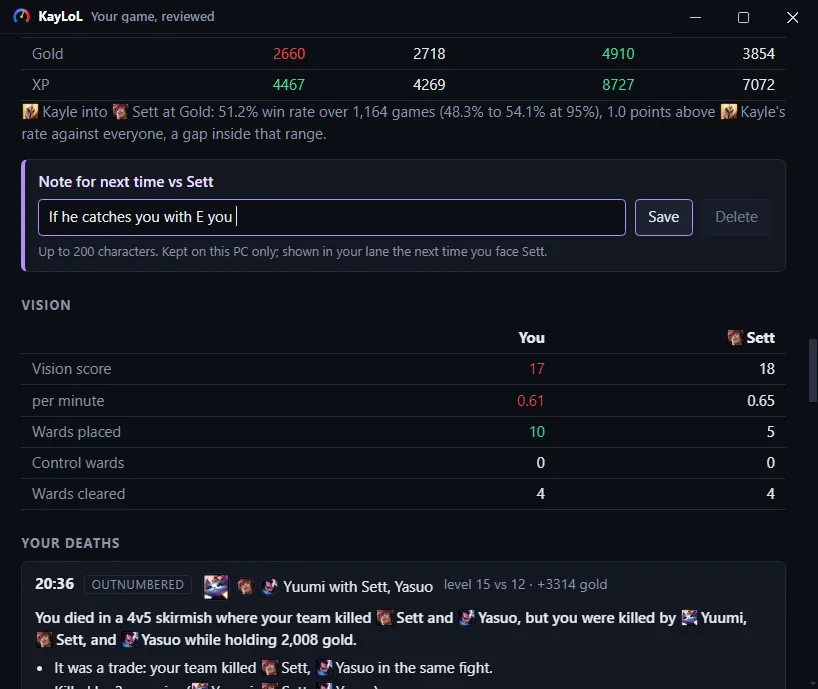
- After the game, turns your deaths into short lessons in a review on your own KayLoL profile, from Riot's match timeline and your own health through the game. From version 0.3.70 the review window comes to the front again when you start the next queue, and the tray menu reopens the last one.
- On the loading screen, where the game itself shows all ten players, scouts the game: each player's rank, recent results, mastery on their champion and play-style tendencies, the other team's win conditions, and the habits you chose to work on.
- While you wait to respawn in a game on Summoner's Rift, shows a card about the death: what the scoreboard says about it, two or three item options with the reason for each, and in ranked solo games your team's chance to win. It offers options and never tells you what to buy.
- From version 0.3.65, during a game on Summoner's Rift, shows a small Items tab at the edge of the screen. Clicking it opens and closes a list of two or three item options for the game as it stands, each with its reason. It offers options and never tells you what to buy. From version 0.3.68, after your first death in a game, a Coach tab under it puts the card about your last death back after you close it. From version 0.3.69, a Plan tab between them opens and closes the game plan and the players' cards that the loading screen showed, and the card about a death and the review after the game show Riot's pictures of the champions they name. Also from version 0.3.69, an option in the item list can carry one more line, “our item model picks this too”, when the site's own item model, trained on ranked games, also names that item first. From version 0.3.73, a Settings window in the tray menu turns the item list, the death card and the tabs, and the review in queue on and off, and in champion select the panels fold into a small pill and open again with a click.
What it reads, and where
Everything it reads comes from the League client’s own local interface (the LCU) on your computer, over a connection to your own machine that never leaves your PC. It reads:
- Champion select: the picks and bans in the order they happened, hovers, the lanes the client assigns your team, the timer, and which champions you can pick, so that on your turn it suggests only those.
- The game phase (lobby, champion select, in game) and which queue you are in.
- Your own account’s identifier, your champion mastery and your own recent match history. Never another player’s name or identity.
- Whether a chat message has just arrived in champion select, so the overlay can move out of its way. Not the message, and not who sent it.
- The position of the League client’s window, so the overlay can sit on it.
- During a game on Summoner's Rift, for the post-game review: the game clock and, about your own champion only, your health, your mana or energy and the gold you are holding, every two seconds and every half second while your health is falling, from League's Live Client Data interface on your PC. Of the other nine players, that recording keeps only which champion died and for how long: no names, no items, no scores.
- Also during a game, for the death card, the item list and the win chance: the scoreboard the game shows every player (champions, levels, items, kills, deaths and assists, creep score, who is dead, the objectives taken and the kill feed), once a second, from the same Live Client Data interface. The item list reads it when you open the list and every 20 seconds while it stays open. The summoner names in it are dropped on your PC and never sent.
Some of what it reads stays on your PC and is never uploaded: hover events, a trimmed copy of each champion select (champion ids, lanes and the order of actions, with identities and the chat password removed), and a queue of snapshots waiting to be sent, all in the %LOCALAPPDATA%\KayLoL folder. On the same PC it also answers one page: after you click “Follow my champion select” on the kaylol.gg Draft page, that page reads the champion-select board (champions by side and lane, the bans and whose turn it is; no names) straight from the companion, at an address only your own computer can reach. The page then has those champions scored like any draft entered on it.
What it sends to kaylol.gg
- A snapshot of the draft on every change: champions, bans, lanes, the order of picks, rank tier, patch and server, under a random token made for that champion select. Only for ranked and normal draft games on Summoner’s Rift; practice tool, custom and unrecognized queues are shown on screen and never sent. Snapshots carry no name, Riot ID or PUUID.
- Requests for numbers: the board, to get the win probability, pick recommendations and lane advice. From your own pick onward these include your own account’s PUUID, so the prediction can use your history. Nobody else’s identity is ever sent.
- Reads of public data: the champion list, tier-list tables and rune statistics, and a check for a newer version (it offers an update and never installs one by itself).
- At the end of a game: your Riot ID, the game's id and that recording, once, so the server can build your post-game review from Riot's match timeline. What is kept is set out in the privacy policy. From version 0.4.3, after a recorded game it also sends your own Riot letter grade, server, game ID and champion ID directly, using your own Riot ID to check participation; no KayLoL profile link is needed. The server keeps the client-reported grade with your role, patch, queue and selected own completed-game statistics for grade research, under a salted player handle. These labels have no automatic expiry and are not win-prediction inputs. Anonymous runs send no grades, and from version 0.4.4 unticking Share my Riot grades in the tray menu stops grade uploads and drops any still queued. Profile deletion or an erasure request removes your stored labels.
- Your champion select to your own profile, only if you link the companion: after you link the companion to your KayLoL profile with a one-time code from your profile settings, and while “Send champion select and my live game to my phone” is on in its tray menu, it sends the champions by side and lane, the bans and whose turn it is to your own KayLoL profile, so a phone, or the Draft page in a browser, signed in to that profile can show them. It carries no name, Riot ID or PUUID. This is off by default, and you can switch it off or unlink the computer from the tray menu at any time. The server keeps the board only while the draft is live, at most 10 minutes after the last change. During a game the same switch also sends the scoreboard the game itself shows every player (champions, levels, kills, deaths and assists, creep score, items, who is dead and the objectives taken; no names and no gold) every few seconds, so your phone and the Live game page in a browser signed in to that profile can show it. The server keeps only the latest scoreboard, only while the game runs, at most 2 minutes after the last update.
- At the loading screen: your own Riot ID, your server, rank tier, the patch and the champions by lane, so the server can find your game through Riot's API and answer the scouting cards. The other nine players are looked up by the server from the game Riot reports, never by the program on your PC. Their names come back only as the labels the loading screen already shows, never for a player in Streamer Mode or one who opted out, and never during champion select. From version 0.3.92, once you lock your champion in champion select: your champion, your role, your lane opponent's champion when it locks, your server, rank tier and your own Riot account id, so the server can answer the lane plan. No other player's identity.
- While you are dead: that scoreboard, reduced to champions and numbers with no summoner name, with your own Riot ID, server and rank tier so the card can use your own record, and the loading screen's play-style tags for the enemy champions. The server answers the card and does not keep the scoreboard. In ranked solo games the same scoreboard also goes every 30 seconds, with the draft's champions by lane, your server, the patch, the game's id and the chance the loading screen answered, for the win chance; the server logs champions and numbers from it, no names. From version 0.3.92 that win-chance request runs for the whole ranked solo game, not only while you are dead, unless you turn off “Show the win chance during a game” in the companion's settings.
- For the item lists (from version 0.3.65): when you press Set, the champions by lane as champion select shows them, and when you open the Items tab, that scoreboard reduced to champions and numbers; both with your server and rank tier, and with no summoner name and no Riot ID. The server answers the item options. While the site's item model is being tested it also logs, for each game and minute you ask about, the ten champions, your side and lane, your gold and items, your server and rank tier and the model's answer: ids and numbers, no names and never a Riot ID.
What the server does with a draft and a prediction is what it does for the draft page, set out in the privacy policy.
What it does not do
- It does not read or change game memory, inject anything into the game, or hook the game process. Its windows are ordinary windows: one over champion select, a panel on the loading screen, a card while you are dead, and the Items tab with the list it opens.
- It does not automate anything: no picks, no bans, no accepting a match, no dodging, and nothing at all during the game. The only things it writes to the client are a rune page named “KayLoL”, your two summoner spells and an item set named “KayLoL”, and only after you press the button; the item set alone is then kept up to date until that game starts. It never deletes or overwrites a rune page or an item set you made.
- It does not ask for, store or send your Riot password or any other login. The local key the League client gives it to read champion select stays on your PC.
- In champion select it does not read or look up other players’ names or identities. It shows them only from the loading screen on, where the game itself shows all ten players. It never reads anyone’s chat messages.
Requirements
- 64-bit Windows 10 or 11.
- The League of Legends client, installed and signed in.
- About 75 MB of disk space.
- Because the beta is not code-signed yet, Windows SmartScreen shows “Windows protected your PC” the first time; choose More info, then Run anyway.
Build 0.4.4 of the installer has SHA-256 6b1f1a2e1fee1029b475491971a669cdd2227a84876526f19f36d7a9f69054d0. Before running it, check that Get-FileHash in PowerShell prints the same value for the file you were sent. A matching hash shows the file is the one this page names; it does not say who made it, which is what a signature will add.
How to uninstall
If you turned on Open with League of Legends in its tray menu, turn it off first, then choose Quit KayLoL Companion in the same menu.
Installed version: Windows Settings → Apps → Installed apps → KayLoL Companion → Uninstall. Portable version: delete the .exe file.
To remove what it kept on your PC, delete the %LOCALAPPDATA%\KayLoL folder and the KayLoL Companion folder inside %APPDATA%.
Privacy
The companion sets no cookie and runs no analytics. Its draft snapshots are research data about drafts and carry no identity. A prediction that uses your PUUID is handled like a prediction on the draft page with your own Riot ID: the PUUID is used for that prediction and is never written to the prediction log. The full policy is the privacy policy.
Private Beta Registration
The beta is by invitation while the companion is tested on real ranked drafts and Riot is told about its use of the League client, as Riot’s policy requires. To ask for a place, write to contact@kaylol.gg with the server you play on.
Reporting a problem
Write to contact@kaylol.gg with what happened, roughly when, and the version you were given. Anything that looks like the companion acting on its own in the client is the most important thing to report, and it will be answered first. You can also post on the ideas board.
Riot Games
KayLoL and its companion are not endorsed by Riot Games and do not reflect the views or opinions of Riot Games or anyone officially involved in producing or managing Riot Games properties. League of Legends and Riot Games are trademarks or registered trademarks of Riot Games, Inc.